With all of the folders people create these days, it can sometimes seem very difficult to find a particular folder when searching. This is especially true when searching through the "My Pictures" folder.
However, there is an easy solution. You can change the Folder Image.
The default image for a folder is the picture of a folder. However, the Folder Image is just that, an image.
If you would like to change a particular folder image, follow these simple steps:
1) Right-click on the Folder and choose "Properties"
2) In the Properties window, click on the "Customize" Tab
3) Click on "Choose Picture" and find a picture in your computer that you'd like to use for this particular folder.
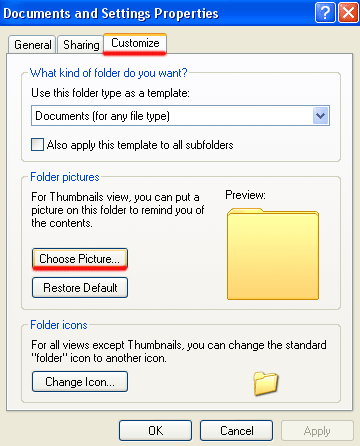
4) Click "OK" and notice the changed Folder image.
Continue to do this for any folders you wish to change. It's that simple!
Showing posts with label folder image. Show all posts
Subscribe to:
Posts (Atom)
Most Popular
-
Have you ever printed a document only to remember that you forgot to print that one last line? Save a tree and save some ink with this tip. ...
-
Intrenational users sometimes view things differently than here in the US. But, did you know you can change Excel to International View? ...
-
I often hear people say "I no longer see the Forward, Reply, and Reply to All buttons on my emails. How do I get this information back?...

